How it works
How Tree Atlas works, from the site visit to the signed report
Record each tree on site from a photo, online or not. Check the survey at your desk, then sign and send the BS 5837 report, Tree Constraints Plan, schedule and DXF. Share the job with your crew. One survey, no retyping.
- No card
- Cancel any time
- Works offline
- Data stays in the EU

Step 1
Record on site, photo first, with or without signal
Take a photo and the tree is placed by GPS. Species is suggested from the photo, and is never saved until you confirm it. Measurements, condition and voice notes go straight onto the record.
- Trees, photos, measurements and voice notes are saved on the phone and upload when you are back in signal.
- Speak, press Stop, and the voice note is transcribed. Transcription can be turned off.
- Save and next carries the last tree's values forward, and Undo brings back a tree saved by mistake.

Step 2
Placed on the map, inside the site boundary
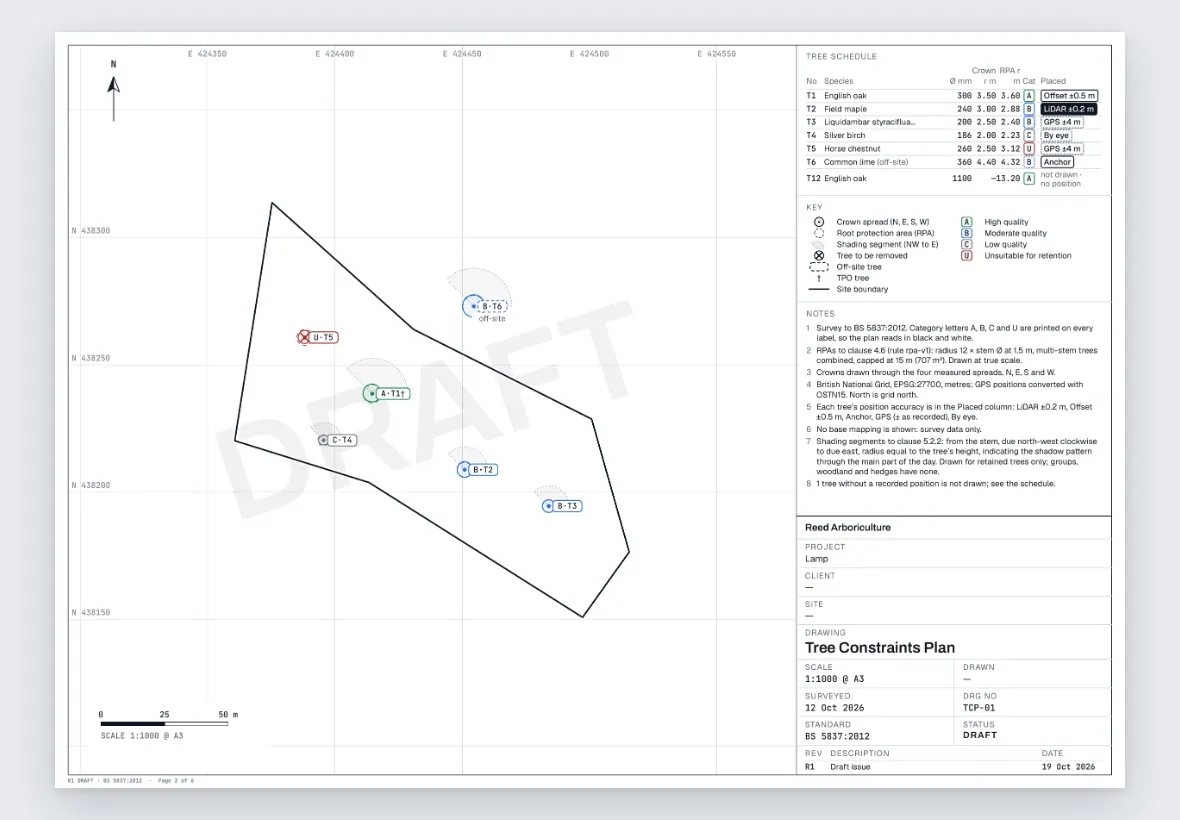
Each tree goes on the site map with its label, category and number, such as A·T1 or U·T5. Place a tree precisely from GPS, by offset or from a nearby map feature.
- The boundary comes from an address: Ordnance Survey plot boundaries, or walk the perimeter, or draw it on the aerial map.
- Split a big estate into 50, 100 or 150 m sectors. Groups, woodland and hedges too.

Step 3
Measurements in, the RPA and category proposed
Stem diameter, height, crown spread north, east, south and west, life stage and condition. The root protection area is worked out from the stem as you type, multi-stem too, and a BS 5837:2012 category is proposed from your condition, life stage and measurements. Your override is final.
- The rule version is stamped on every tree and report, and the method is set out in the report appendix.
- Type in feet and inches if you prefer; reports always stay metric.

Step 4
Review at the desk, then sign it off
Surveyors capture. Reviewers check. You sign, on the web desk. Before you sign, see exactly what changed since the last signed revision, tree by tree. Nothing goes out under your name until you've signed it off.
- Revisions go Draft, In survey, Signed. Signed revisions are kept exactly as issued.
- Roles for owner, surveyor and reviewer.
Step 5
Reports and plans from the same records
Preview, sign and download. The report has a cover, revision block, schedule and method appendix. Your client receives the report and Tree Constraints Plan as PDFs, and a DXF for their CAD.
- PDFBS 5837 report
- PDFTree Constraints Plan
- CSVTree schedule
- DXFCAD by category
Step 6
Share the job with your crew
On a site, Site details › Share job gives you a link and a QR code. Your crew opens the job without an account: the map, directions and the work tree by tree. Once opened, it works with no signal.
- Customer contact and tree notes are shared only if you switch them on, and you can cancel a link at any time.
- Turn recommendations into tasks with due dates, reminders and repeats.

Survey your next site with Tree Atlas
Solo is £49 a month plus VAT (£58.80 including VAT) after a 30-day free trial. No card is needed to start.
- No card
- Cancel any time
- Works offline
- Data stays in the EU